A tariff is a tax the government charges on items you bring into the country. These fees eat into your bottom line if you pay them out of your own pocket.
Passing tariff costs to your customers keeps your business profitable when importing goods.
QuickBooks Online gives you a simple way to bill this cost to the buyer. You can bundle it into your price or list it clearly on the sales receipt.
This guide shows you how to set it up.
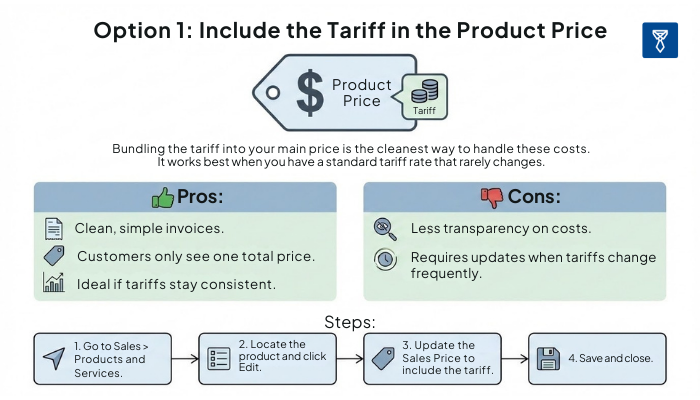
Bundling the tariff into your main price is the cleanest way to handle these costs.
It works best when you have a standard tariff rate that rarely changes.
Pros:
Cons:
Steps:
💡Click to view full image
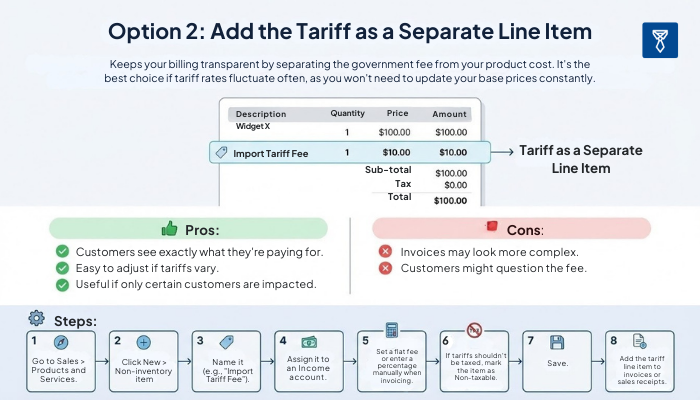
Option 2 keeps your billing transparent by separating the government fee from your product cost. It's the best choice if tariff rates fluctuate often, as you won't need to update your base prices constantly.
Pros:
Cons:
Steps:
💡Click to view full image
Example:
|
Item |
Qty |
Rate |
Amount |
|---|---|---|---|
|
Product A |
1 |
$100 |
$100 |
|
Import Tariff Fee |
1 |
$10 |
$10 |
|
Total |
$110 |